
Payment badges
The payment badges are designed for implementation in the checkout, alongside the other available payment methods.
The badges are available in SVG and PNG-formats. For web implementation, we recommend using SVG for optimal scalability and sharp rendering across different screen sizes and resolutions.
Preferred badge – default
The payment badge with a black background is the default and preferred variant. Always use the standard version whenever possible to ensure a consistent and recognisable implementation.
A wide variant is available for layouts where the standard badge does not fit optimally due to sizing or space constraints. Only use the wide variant when it provides a better fit within the available layout.
Standard

Wide

Alternative badge – dark mode white
For dark interfaces, an alternative badge with a solid white background is available. Use this variant when the default badge does not provide sufficient contrast against the background.
Standard
Wide
Alternative badge – dark mode transparent
A transparent variant is also available for dark interfaces. This version uses white outlines to ensure visibility against dark backgrounds. Only use this variant on backgrounds that provide sufficient contrast.
Standard
Wide
Light & dark mode
- In light mode, use the default badge with the black background.
- In dark mode, use one of the provided dark mode variants.
- Select the variant that provides sufficient contrast against the interface background.
- Only use the officially provided variants. Do not create custom light or dark mode versions.
Dimensions & proportions
Always scale the payment badge proportionally and maintain its original aspect ratio. Do not stretch, crop, rotate or alter the proportions of the badge.
Colour usage
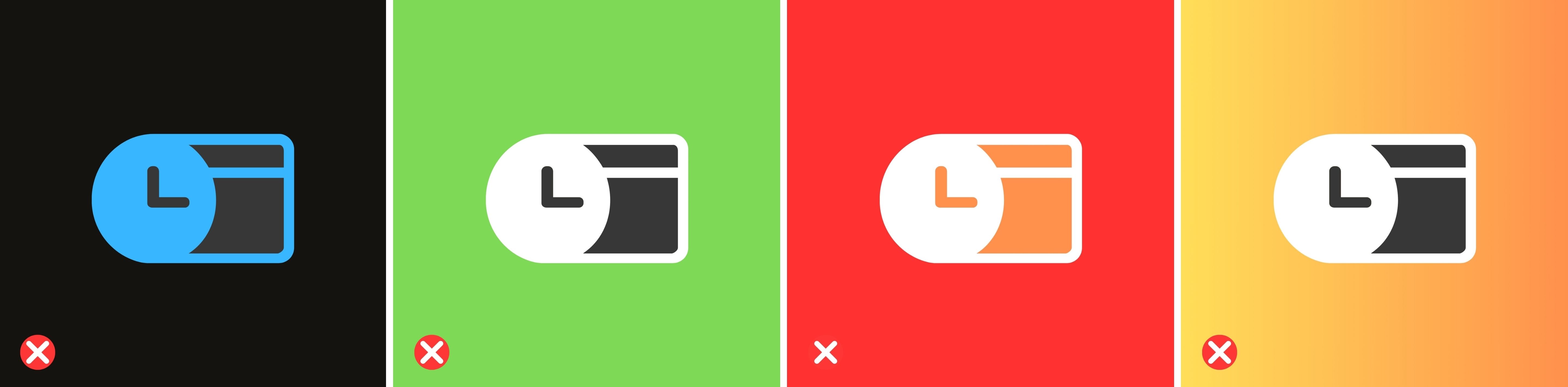
The colours and visual appearance of the payment badges are fixed and must not be modified. Always use one of the officially provided assets.
Do not:
- Change the background, text, outline or brand colours.
- Adapt the badge to match your own brand identity.
- Add gradients, effects or transparency.
- Change the opacity.
- Remove or modify individual elements.
- Distort, rotate or crop the badge.
- Create custom colour variants.


On this page
- Payment badges